Sort the plant list by a chosen criterion such as capacity or generation.
Estimated time: 2~3min · Last updated: 2026-03-21
How to
When you want to see the highest-capacity plants first
Starting state: The plant list screen is open
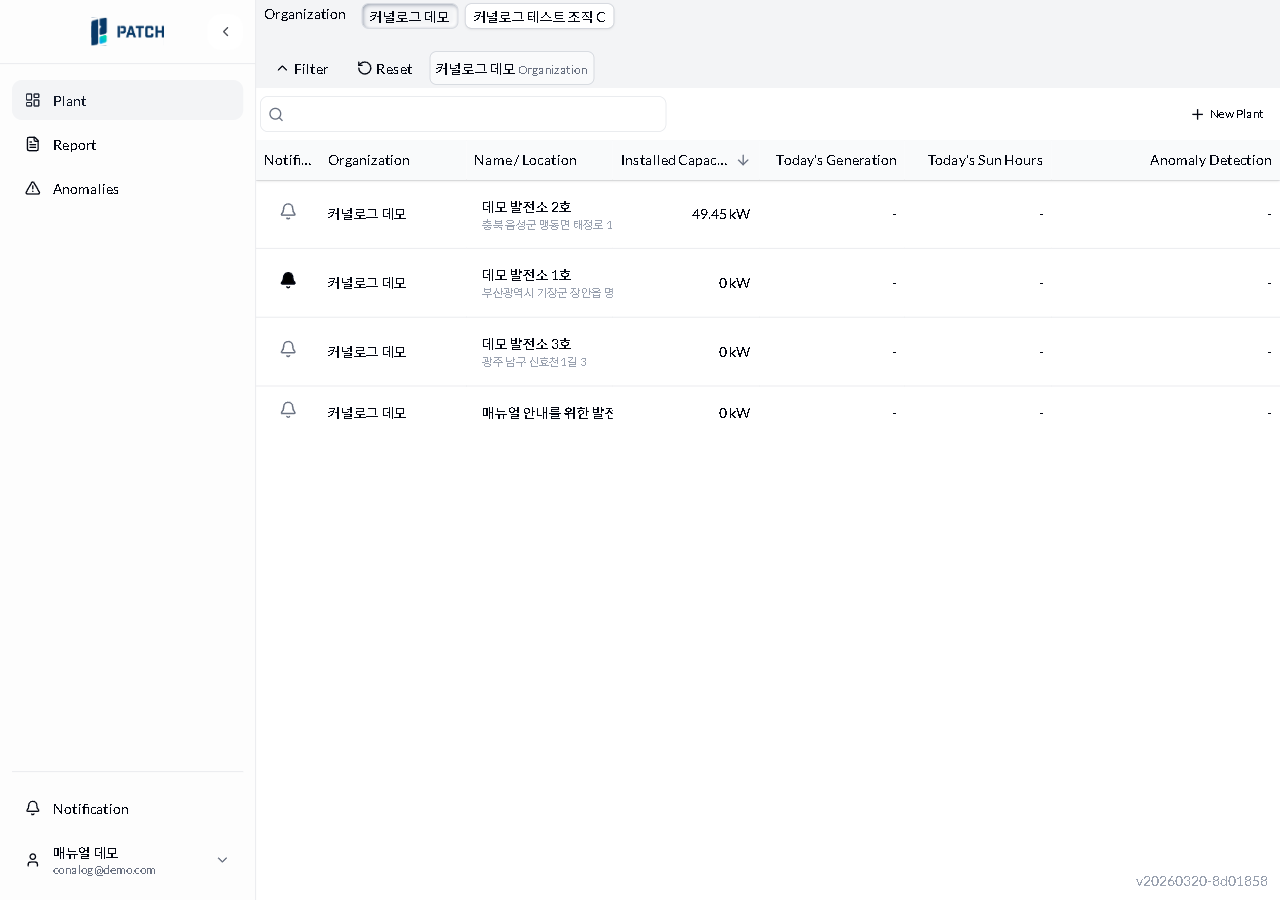
Click the column header you want to sort by (e.g., Installed Capacity). All 6 columns are sortable: Organization, Name/Location, Installed Capacity, Today's Generation, Today's Sun Hours, and Anomaly Detection. Only the Notification column is not sortable.
Click the same header again to switch to ascending order.
Expected result
Each click toggles between descending and ascending order, and an arrow indicator appears on the active sort column.
If it does not work
If no sort arrow appears, click the same column header once more.
Step-by-step screenshots
Follow the red-numbered hotspots in the images below alongside the steps above.
1. Click the column header you want to sort by (e.g., Installed Capacity). All 6 columns are sortable: Organization, Name/Location, Installed Capacity, Today's Generation, Today's Sun Hours, and Anomaly Detection. Only the Notification column is not sortable.
1
설치용량 내림차순 정렬
Sorted by capacity descending — C-Test1 (999kW) at top, down arrow shown on Capacity column header
Capacity column header — down arrow indicates current sort. Click to toggle between descending and ascending.
2. Click the same header again to switch to ascending order.