Home > A. Getting Started > Log in to PATCH
How to
When accessing PATCH for the first time
Starting state: You have opened patch-new.conalog.com in a web browser
- Enter your email and password, then click Log In. You are taken to the plant list screen (/app).
- If your Google or Kakao account is linked, click the corresponding social login button for the same result.
- If you do not have an account, click Sign Up. If you forgot your password, click Reset Password.
Expected result
After a successful login, the plant list screen (/app) opens and your registered plants are displayed.
If it does not work
- If your password is wrong, click Reset Password.
- If you do not have an account, click Sign Up to create one.
- If the Log In button does not respond, refresh the browser (F5).
Step-by-step screenshots
Follow the red-numbered hotspots in the images below alongside the steps above.
1. Enter your email and password, then click Log In. You are taken to the plant list screen (/app).
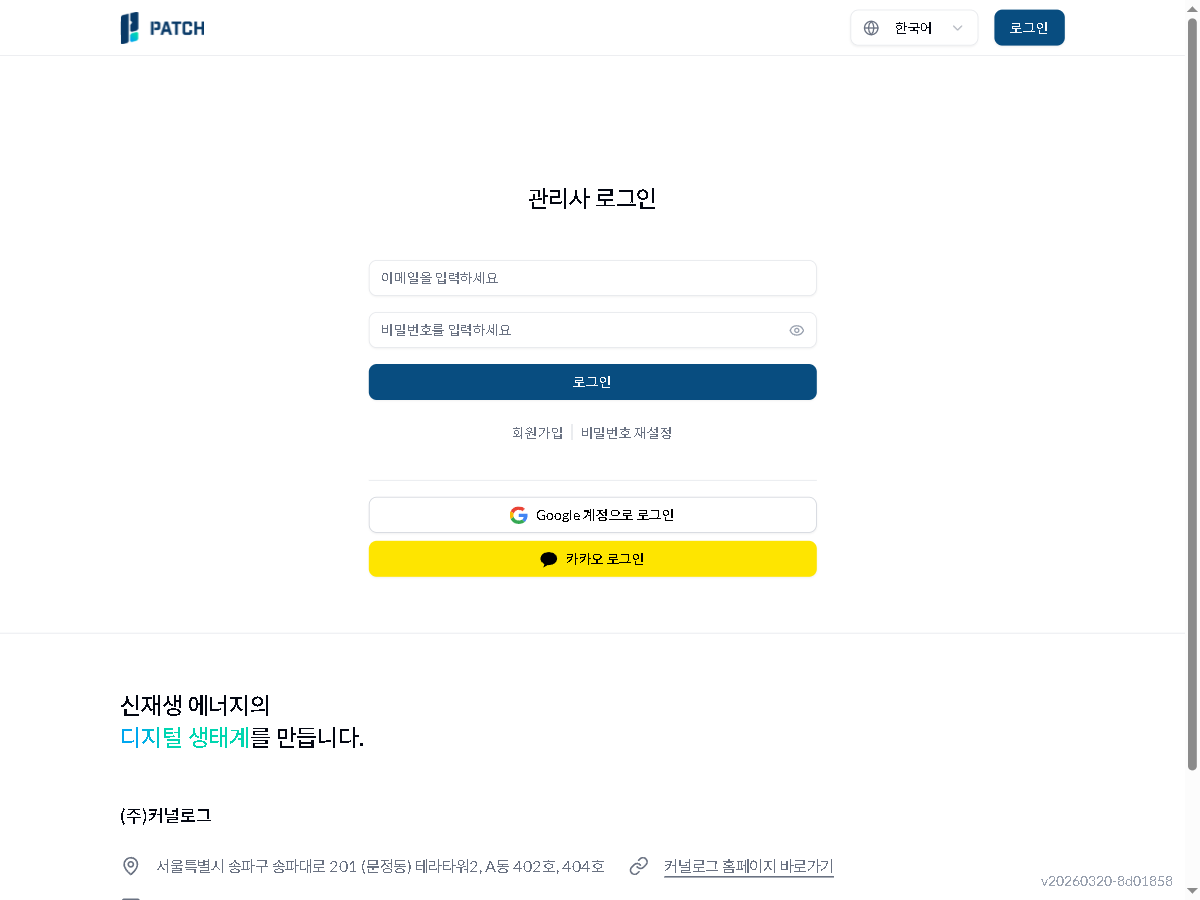
1
로그인 화면
PATCH login screen — email/password form, login button, social login, sign-up and password reset links visible
- Email/password input form and login button — enter email and password, then click login
2. If your Google or Kakao account is linked, click the corresponding social login button for the same result.
2
로그인 화면
PATCH login screen — email/password form, login button, social login, sign-up and password reset links visible
- Social login area — sign in with Google or Kakao
3. If you do not have an account, click Sign Up. If you forgot your password, click Reset Password.
3
로그인 화면
PATCH login screen — email/password form, login button, social login, sign-up and password reset links visible
- Sign up / Reset password links